The Dedicated Mobile App Built for Discord Staff.
Stop letting tickets get lost in messy Discord channels. Receive instant push alarms, filter claimed vs. unclaimed inquiries, spot repeat users, and highlight VIP customers—all from your Android phone.
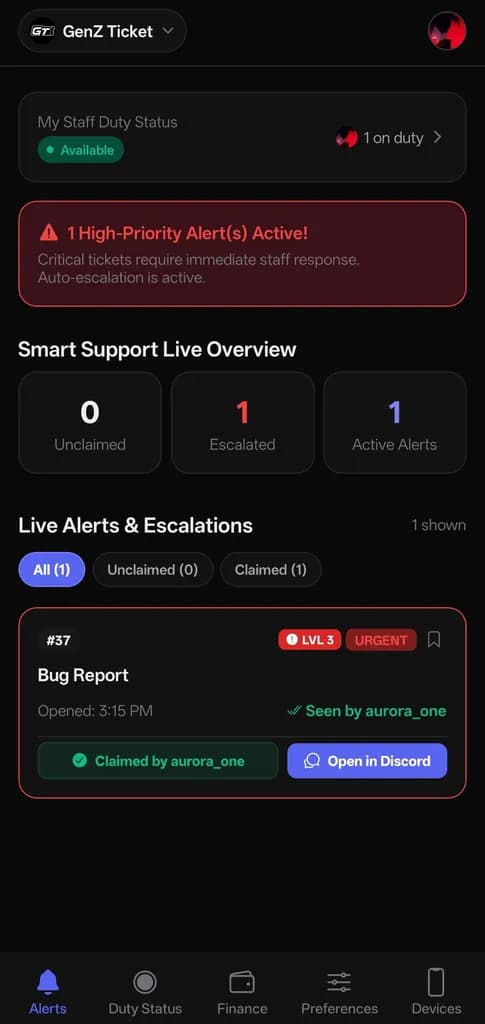
Instant priority pings with Unclaimed & Claimed tabs.
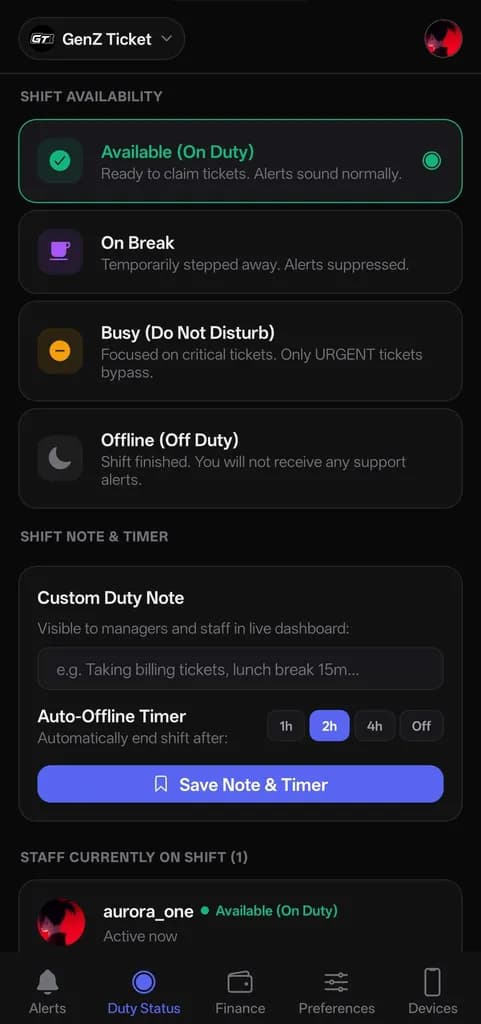
Toggle Available, On Break, Busy (DND), and Auto-Offline.
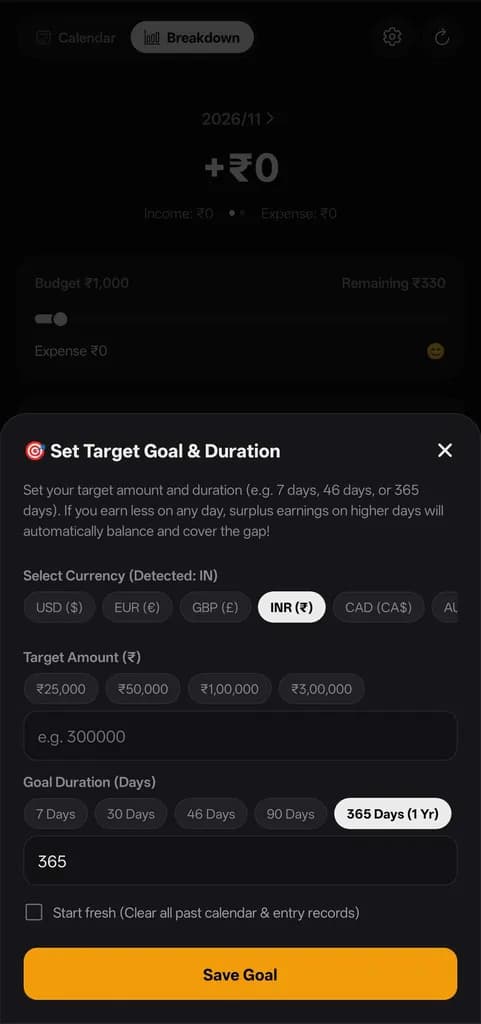
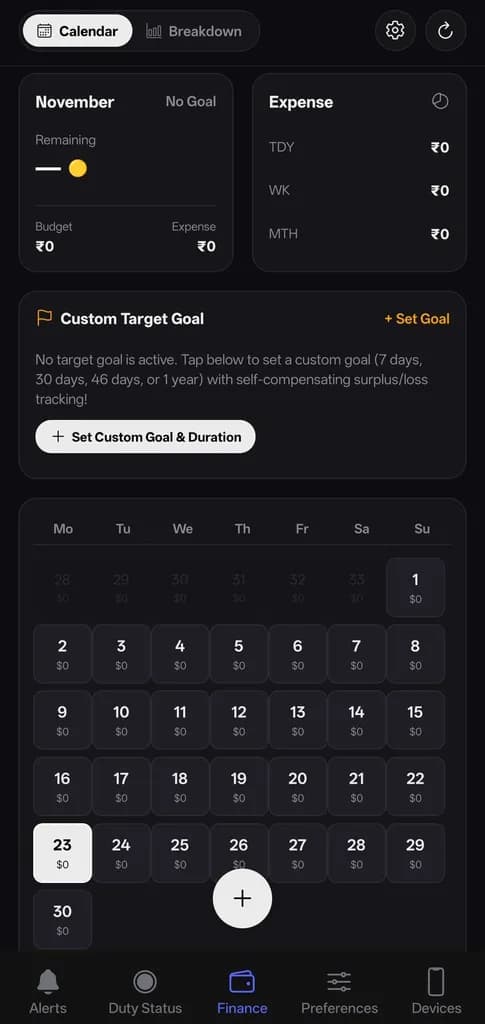
Multi-currency targets with self-compensating run-rates.
Why Traditional Ticket Bots Fall Short
Most Discord bots only create text channels in Discord. When staff manage multiple servers, notifications get muted and tickets go unnoticed for hours. Here is how GenZTicket changes the game.
| Key Capability | Other Ticket Bots (Ticket Tool, Helper.gg, etc.) | GenZTicket + Mobile Companion |
|---|---|---|
Ticket NotificationsNever Miss A Ticket | ✕Buried under 50+ server pings, muted channels, or missed when away from PC | ✓Dedicated Android push alerts with priority alarms that wake your screen instantly |
Ticket Queue ManagementInstant Queue Filters | ✕Messy list of 30+ open Discord channels; staff can't see who is handling what | ✓Live Unclaimed vs. Claimed tabs with 1-tap mobile claiming and ownership sync |
Repeat Customer DetectionSmart Recognition | ✕No context. Staff have no idea if a user opened 5 tickets before | ✓Automated 'Repeat User' tag highlights previous ticket history instantly |
VIP & Paid Role HighlightingVIP Priority | ✕Paying customers look identical to random users in channel lists | ✓Luminous VIP badges and elevated ticket cards for users holding assigned paid roles |
Anti-Spam & BlacklistingSelf-Cleaning Bans | ✕Requires manual server kicks or clumsy full-server channel bans | ✓Granular feature blacklists with auto-expiring timers (e.g. 24h) that auto-lift |
Staff Shift AvailabilityTeam Roster Sync | ✕Nobody knows who is active, on break, or off-duty without asking in chat | ✓Live Duty Modes: Available, On Break, Busy (DND), Offline with auto-off timers |
Support Earnings & FinanceSupport Finance | ✕Non-existent. Staff must track tips or compensation in external spreadsheets | ✓Built-in multi-currency calendar with sprint target goals & deficit auto-compensation |
Built Specifically for Active Support Teams
Engineered to make your support operation faster, cleaner, and more responsive than ever before.
Never Miss A High-Priority Ping
Discord is loud. When you belong to dozens of servers, important ticket mentions get drowned in meme channels and @everyone pings. GenZTicket bypasses the noise by sending dedicated smartphone push alerts with distinct priority alarms directly to your pocket.
Claimed vs. Unclaimed Live Sorting
Keep ticket chaos under control. Toggle between Unclaimed (fresh inquiries needing immediate response) and Claimed (tickets already owned by team members). Claim tickets with a single tap from your phone to prevent duplicate staff replies.
Repeat Ticket Opener Identification
Know your customer before you even reply. GenZTicket automatically inspects user ticket history and tags frequent requesters with a clear 'Repeat User' badge so your staff can deliver personalized, high-context assistance.
VIP & Paid Customer Card Highlighting
Give your donors, premium subscribers, and paid role members first-class treatment. Tickets opened by users with configured paid roles glow with distinctive VIP badges, ensuring high-value clients receive instant expedited care.
Feature Blacklists with Auto-Expiry
Tired of ticket spammers? Put unruly users on a temporary cooldown without kicking them from your server. Set custom expiration schedules (e.g., 24 hours, 7 days) that automatically expire and restore access with zero admin maintenance.
Staff Shift Availability & Roster
Set your current duty status to Available (ready for alerts), On Break, Busy (urgent escalation bypass only), or Offline. Configurable auto-offline timers ensure you don't receive late-night alarms when your shift ends.
Support Earnings & Finance Tracker
Track your ticket earnings, support tips, and team expenses. Features global currency detection (USD, EUR, GBP, INR, CAD), custom sprint goals (7d to 365d), and intelligent self-compensating surplus/deficit run rates.
One-Tap Claim & Close Controls
Resolve tickets on the fly. Claim ownership, review full ticket details, and cleanly close inquiries with resolution confirmations directly from the mobile app without having to boot up your PC.
Every Screen Engineered For High-Volume Support
Explore the real interfaces your staff will use daily to triage tickets, claim inquiries, set duty shifts, and track earnings.
Live Ticket Queue & Priority Escalations
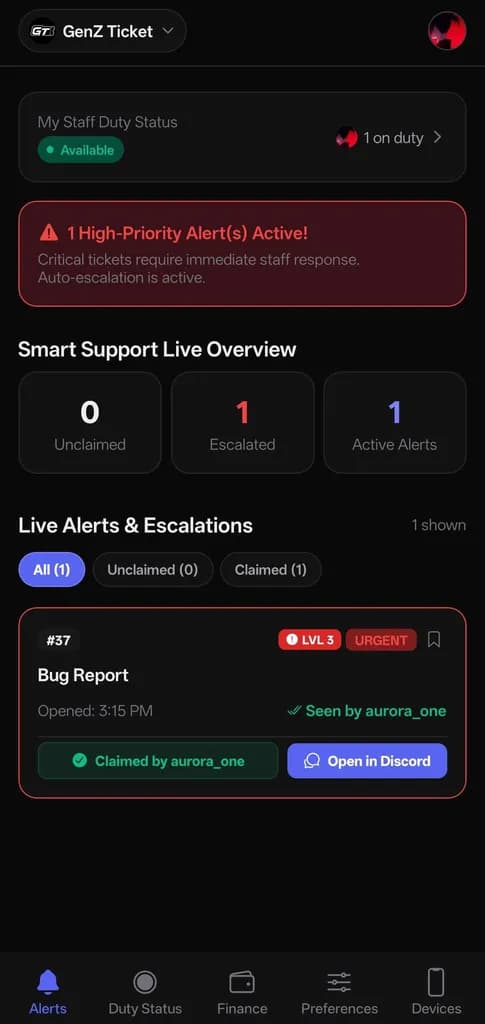
When users open tickets, they appear instantly on the mobile queue. The top navigation cleanly separates Unclaimed tickets from Claimed ones, showing ticket number (#37 Bug Report), creator avatar, department, priority badges, and elapsed wait time.
- Red Urgent Priority badges for critical community bugs
- Real-time presence: see which other staff members are currently looking at the alert
- One-tap claim button assigns the ticket to you and notifies Discord immediately
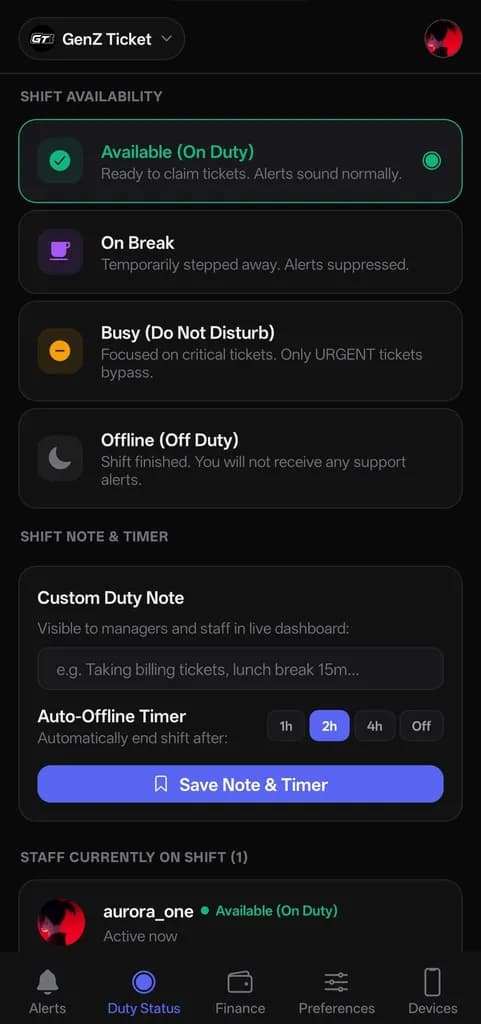
Live Duty Modes & Shift Presence
Ensure coverage around the clock without burning out your staff. Team members can easily update their operational status with a single tap:
Ready to receive all incoming alerts.
Temporary pause; alerts held for team.
Only urgent escalations break through.
Off-shift; quiet hours respected.
Support Earnings & Sprint Target Goals
If your server compensates support agents or accepts member tips, the staff app includes an interactive daily financial tracker with monthly calendar views and sprint target goals.
- Automatic global currency detection (USD, EUR, GBP, INR, CAD, and more)
- Sprint duration options: 7-day, 30-day, 46-day, or 365-day annual goals
- Self-compensating run rate: extra earnings automatically cover prior deficit days
Get The GenZTicket Staff App
Equip your community support team with instant smartphone alerts today. Download the APK directly and install in seconds on any Android phone.
3 Simple Steps to Install
Download APK
Tap the download button above on your Android smartphone to save the installer file.
Allow & Install
Open the downloaded file. If prompted by Android, permit "Install unknown apps" and tap Install.
Login with Discord
Sign in with your Discord account. All your staff roles and servers sync instantly!